Welcome to the future of dining and business management! Setting up a table reservation system on eMenu AI is quick, simple, and takes just a few taps. Follow these 5 easy steps to allow your customers to book their tables effortlessly:
*This smart link automatically redirects you to the Apple App Store, Google Play, or Web App based on your device.
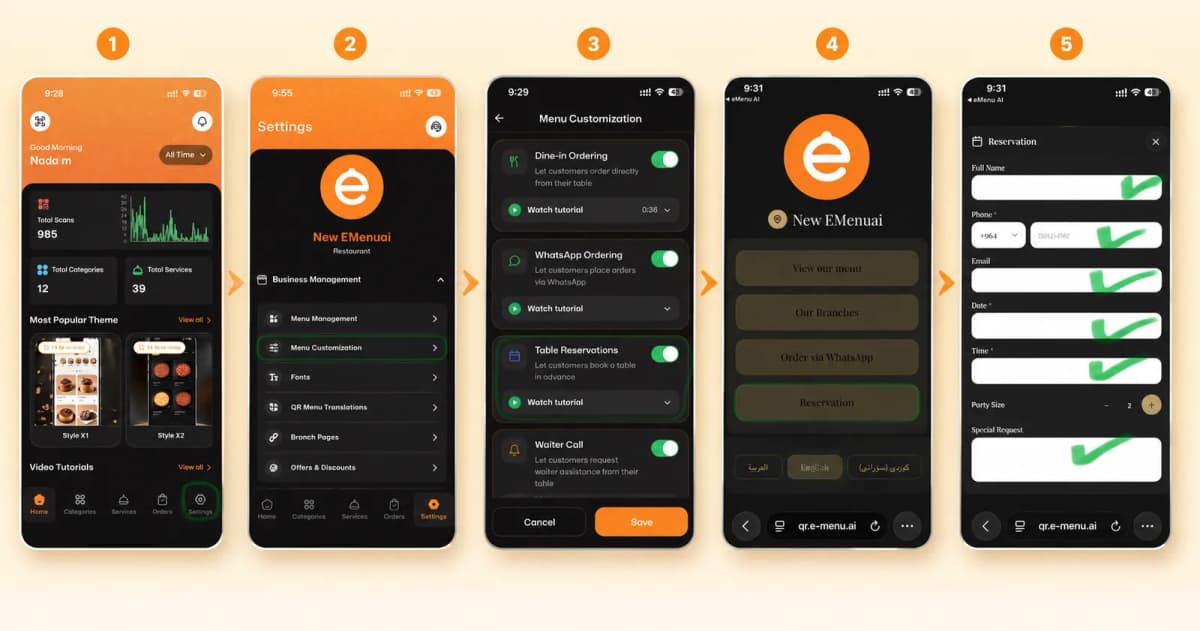
1 Step 1: Navigate to Settings
First, open your eMenu AI app and go to your main dashboard. Look at the navigation bar at the bottom of your screen and tap on the Settings icon.
2 Step 2: Open Menu Customization
Next, in your Settings menu, look under the Business Management section. Tap on Menu Customization to access the interactive features for your digital menu.
3 Step 3: Enable Table Reservations
Now it’s time to activate the feature!
Scroll down until you find Table Reservations.
Toggle the switch to turn it ON (it will turn green). This allows your customers to book a table in advance.
Tap the orange Save button at the bottom of the screen to apply your changes.
4 Step 4: View Your Digital Menu
Your menu updates instantly! When customers visit your digital menu, they will now see a dedicated, easy-to-find Reservation button right on your main page.
5 Step 5: The Customer Booking Form
When your guests tap the Reservation button, they will be greeted with a clean, user-friendly form. To complete their booking, they simply need to provide:
Full Name
Phone Number (with country code)
Email Address
Date and Time of the booking
Party Size
Any Special Requests
🎥 Watch the Registration Tutorial
Need a visual guide? Watch this quick video to see How to Enable Table Reservations on eMenu AI:
🎉 Congratulations!
Your table reservation system is now fully active. You are ready to streamline your bookings, save time, and revolutionize your customer experience with eMenu AI!