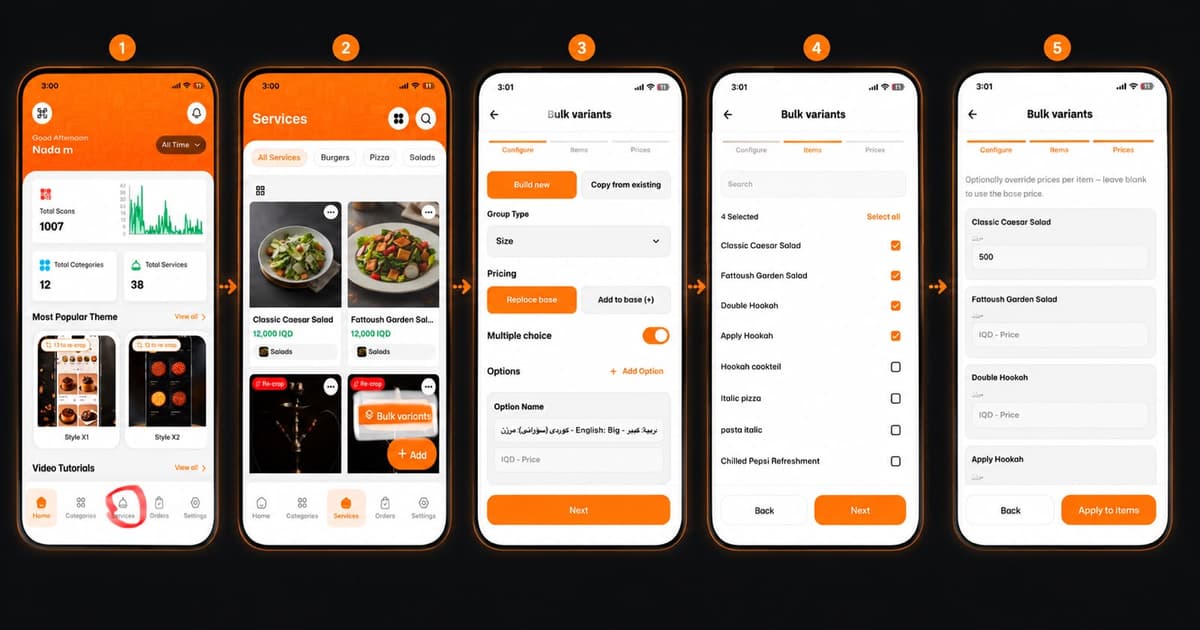
Welcome to the next level of menu management! Updating multiple items at once on eMenu AI is quick, efficient, and saves you valuable time. Follow these 5 easy steps based on image.png to streamline your menu updates using the Bulk Variants feature:
Make sure you are logged into your account and looking at your main Home dashboard.
Step 1: Navigate to Services
First, open the app to your main dashboard. To find your menu items:
Locate the bottom navigation menu.
Tap on the Services icon (the bell shape) to access your complete list of offerings.
Step 2: Access the Bulk Variants Tool
Once you are in the Services section, you can start managing your item details:
Browse through your categories or items (like Salads, Burgers, or Pizza).
Tap the orange Bulk variants button overlaid on the item card to begin customizing options for multiple dishes at once.
Step 3: Configure Your Variants
Now it’s time to define the specific choices you want to offer your customers. Under the "Configure" tab:
Choose whether to Build new or Copy from existing variants.
Select your Group Type from the dropdown menu (e.g., Size, Add-ons).
Choose your Pricing rule: either "Replace base" or "Add to base (+)".
Toggle the "Multiple choice" option if needed, and type in your specific Option Names (e.g., Large, Small) along with their prices. Click Next.
Step 4: Select Applicable Items
Next, decide which menu items will feature these new options. Under the "Items" tab:
Scroll through your menu or use the search bar to find specific dishes.
Check the boxes next to all the items that should share this variant group (e.g., Classic Caesar Salad, Fattoush Garden Salad). Click Next.
Step 5: Adjust Prices and Apply
Finally, review and finalize your pricing structure. Under the "Prices" tab:
Optionally override the prices for each specific item if certain dishes cost more to modify. You can simply leave the field blank to use the base price you set in Step 3.
Once everything looks perfect, tap the orange Apply to items button.
🎉 Congratulations!
Your bulk variants are successfully created and applied to your menu. You are now ready to offer your customers fully customized dining options with just a few taps.