Welcome to smarter upselling! The Collections feature on eMenu AI is a powerful tool that helps you boost your sales by automatically suggesting "You may also want" items to your customers.
*This smart link automatically redirects you to the Apple App Store, Google Play, or Web App based on your device.
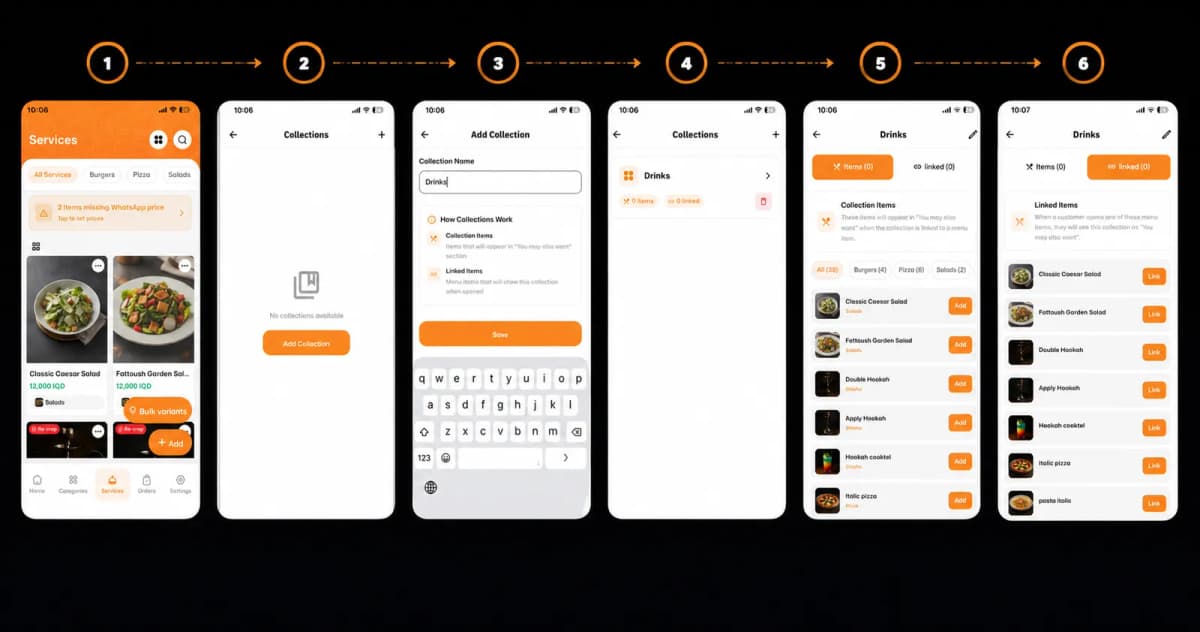
Setting it up is quick and easy. Follow these 4 simple steps to get started:
Step 1: Access the Collections Menu
First, open your eMenu AI app and navigate to the Services tab at the bottom of the screen. Look at the top right corner and tap the Collections icon (the icon with four small squares).
Step 2: Create a New Collection
If you haven't created any collections yet, your screen will be empty.
Tap the big orange Add Collection button.
Type in a clear Collection Name (for example, "Drinks", "Desserts", or "Side Dishes").
Tap Save to create it.
Step 3: Add Items to Your Collection
Now it’s time to fill your collection! Open your newly created collection (like "Drinks") and stay on the Items tab.
Browse through your menu and tap the Add button next to the products you want to group together.
These are the specific items that will be recommended to your customers to buy.
Step 4: Link Your Collection to Menu Items
This is where the magic happens! Switch over to the orange Linked tab at the top.
Tap the Link button next to the main menu items where you want these recommendations to appear.
Example: If you link your "Drinks" collection to a "Classic Caesar Salad," anytime a customer opens that salad, the app will automatically prompt them with: "You may also want... [Drinks]".
Congratulations!
Your collection is now live and fully linked! You have successfully optimized your digital menu to cross-sell items and maximize your revenue. You are now ready to give your customers a smarter, more personalized ordering experience with eMenu AI!