Ready to make your digital menu stand out? Managing your business profile and customizing how your menu looks to customers is incredibly easy with eMenu AI. Follow these simple steps to perfect your digital storefront:
*This smart link automatically redirects you to the Apple App Store, Google Play, or Web App based on your device.
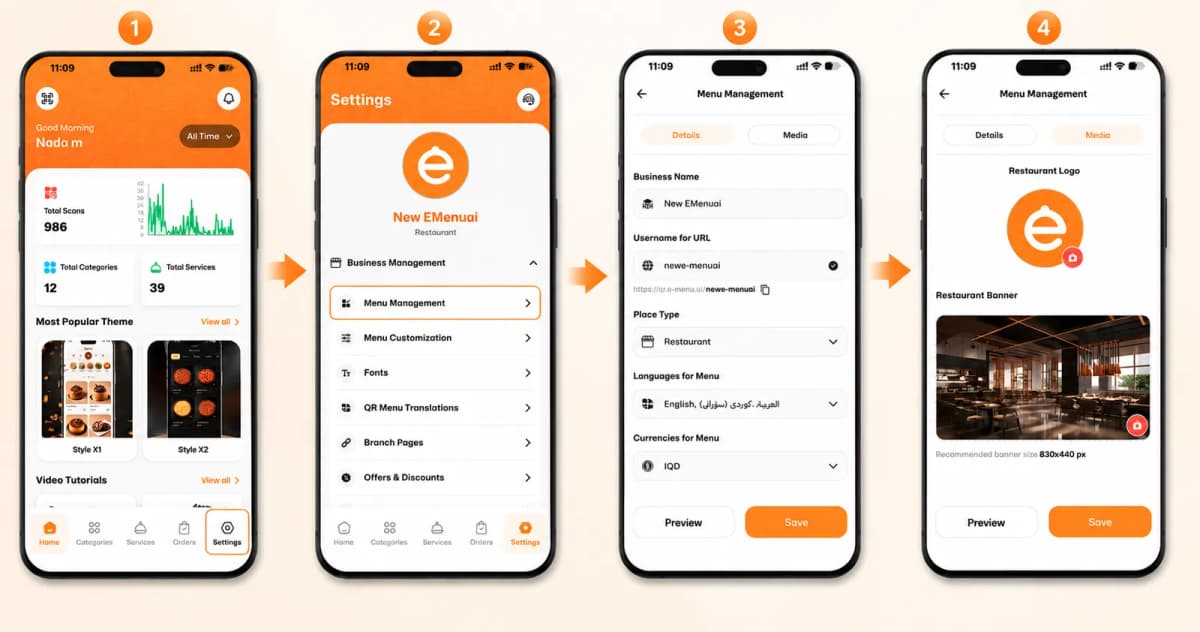
Step 1: Navigate to Menu Management
First, open the eMenu AI app. From your home dashboard, tap the Settings icon in the bottom right corner. Under the Business Management section, tap on Menu Management to get started.
Step 2: Fill in Your Business Details
Inside the Details tab, you will configure the core settings of your digital menu. Please make sure to provide:
Business Name & Custom URL: Enter the name of your restaurant and choose a unique Username for URL to generate your custom shareable link (e.g., qr.e-menu.ai/your-name).
Place Type: Select your specific business category (e.g., Restaurant, Café).
Languages & Currencies: Choose the languages you want to offer your customers (such as English, Arabic, and Kurdish) and set your local currency (e.g., IQD).
Theme & Colors: Scroll down to select your preferred visual layout under Theme (like Style M5) and match it with a beautiful Theme Color.
Step 3: Add Your Media and Branding
Now it’s time to make your menu visually stunning! Tap the Media tab at the top of the screen to upload your branding:
Restaurant Logo: Tap the camera icon to upload your unique business logo.
Restaurant Banner: Upload a high-quality cover photo of your food or interior (the recommended size is 830x440 px) to welcome your guests.
Step 4: Preview and Save
Before going live, tap the Preview button at the bottom left to see exactly how your beautiful new menu will look to your guests. Once you are happy with it, hit the orange Save button to apply all your changes!
🎥 Watch the Registration Tutorial
Need a visual guide? Watch this quick video to see How to Manage and Customize Your Menu on eMenu AI: A Step-by-Step Guide:
🎉 Congratulations!
Your menu is now fully customized and uniquely yours. You are ready to share your QR code and provide a flawless digital dining experience for your customers!