Welcome to the future of dining and business management! Upgrading or managing your subscription plan on eMenu AI is quick, simple, and takes just a few moments. Follow these 3 easy steps to explore our plans:
*This smart link automatically redirects you to the Apple App Store, Google Play, or Web App based on your device.
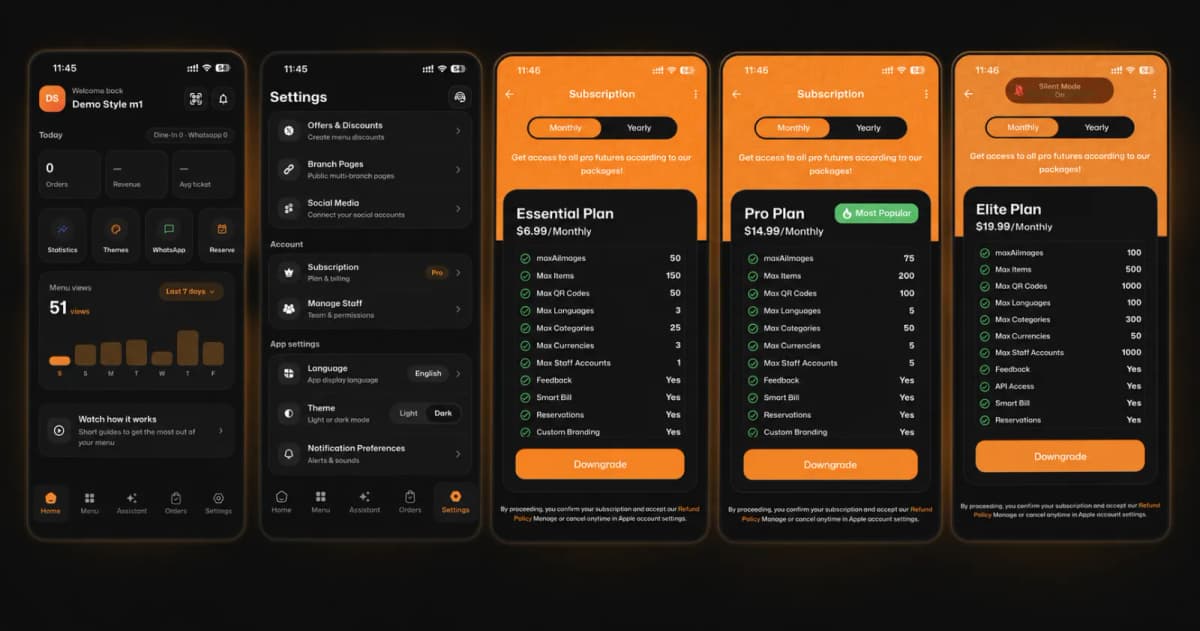
Step 1: Go to Settings
First, open the app and look at the bottom navigation bar. Tap on the Settings icon located on the far right.
Step 2: Access Your Subscriptions
Next, inside the Settings menu, locate the "Account" section. Tap on Subscription (Plan & billing) to view your current status and available upgrades.
Step 3: Choose Your Perfect Plan
Now it’s time to choose how you want to scale your business! Toggle between Monthly or Yearly and browse our packages:
Essential Plan ($6.99/Month): Ideal for starters, giving you up to 150 items, 3 languages, and essential features like Smart Bill and Reservations.
Pro Plan ($14.99/Month): 🔥 Most Popular! Unlock up to 200 items, 5 languages, 5 staff accounts, and more robust features.
Elite Plan ($19.99/Month): Built for large-scale operations. Get massive limits (500 items, 100 languages, 1000 staff accounts) plus exclusive API Access!
🎉 Congratulations!
You now know how to navigate and manage your billing. You are ready to scale your business and revolutionize your customer experience with the right eMenu AI plan!